Essence POS

The heart of your sales

Run every sale with confidence.

Essence POS brings your till, stock, staff and cash-up into one system. Sell fast, know what is happening in your shop, and keep going when the internet drops.

7 days freeNo card requiredSign up on the till

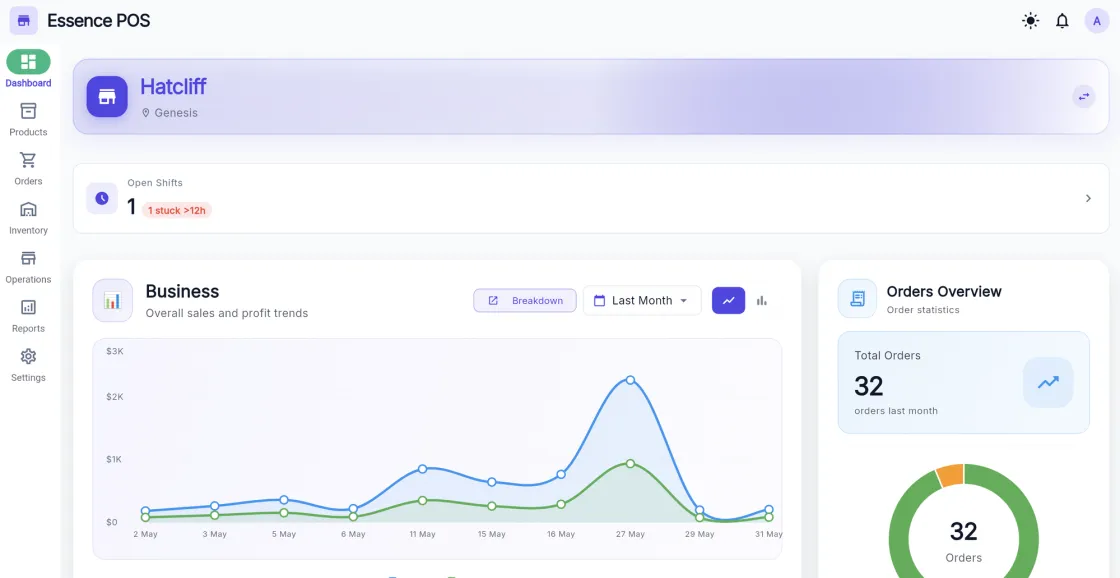
The Essence POS business dashboard showing sales trends, orders and an open shift.
One clear view of the sales, stock and shifts that run your shop.
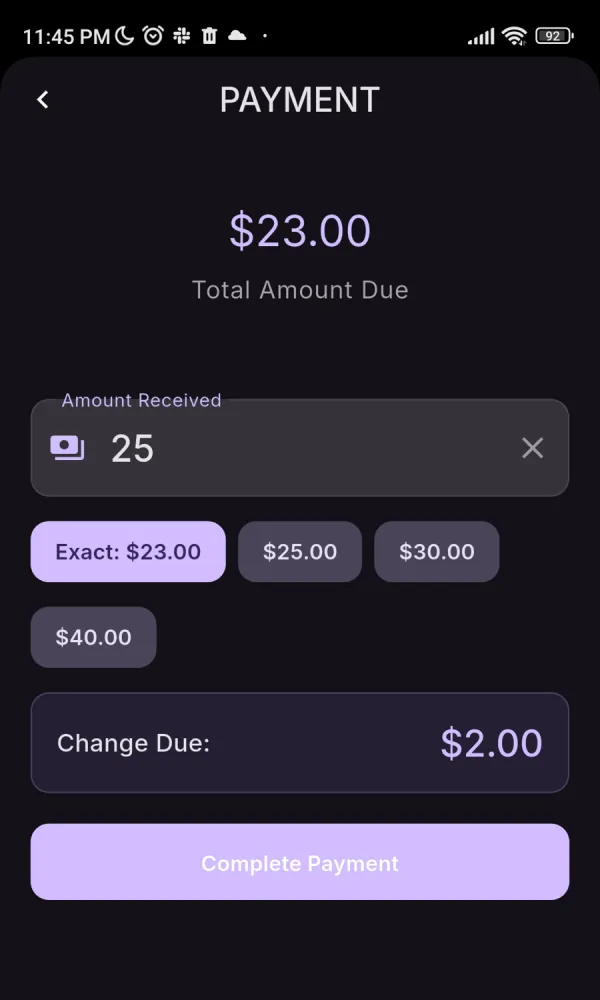
The Essence POS till on a phone, taking a $23.00 payment and showing $2.00 change due.
Sell
The till your staff use all day.
Stock
Know what you have, everywhere.
Money
What you actually made, not just what you took.
People
Who did what, and what they're allowed to do.

What it does

Everything a shop needs, in one book

Not a list of buzzwords — this is what is actually in the till and the dashboard today.

Sell

The till your staff use all day.

A fast till
Search or tap through your products, or punch in a price. Runs on any Android phone or tablet you already have.
Keeps selling offline
Power cut or network down, the till still rings up sales. Everything syncs by itself once you reconnect, and you can see exactly what's still waiting.
Park a sale
Hold an order, serve the next person, come back to it. Nothing lost when a customer goes back for one more thing.
Receipts, printed or shared
Thermal printers over Bluetooth, USB or network — or send a PDF straight to the customer's phone.
Refunds with a record
Refund at the till within your window, and every refund is logged against the person who made it.
More than one currency
Price and take payment in the currencies you actually trade in, at the rates you set.

Stock

Know what you have, everywhere.

Load your stock from a photo
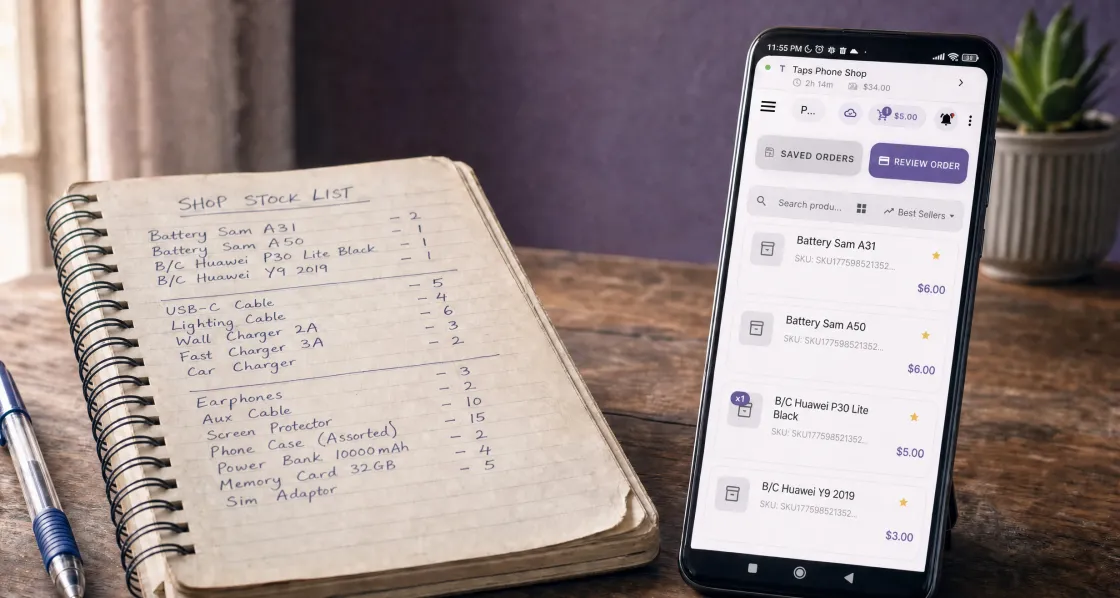
Photograph a handwritten or printed stock list and we type it up — item names and quantities, line by line. This is how most shops get started without a week of data entry. Load stock from a photo →
Stock on hand
What's in each shop and warehouse, updated as you sell.
Alerts before you run out
Set a level per product and get told while there's still time to reorder.
Counts you can trust
Stock counts hide the expected figure, so staff record what's actually on the shelf instead of confirming what the system already thinks.
Move stock between shops
Transfer stock from one branch to another and keep both sides accurate.
Purchase orders that suggest themselves
Order from your suppliers, and let the replenishment worksheet propose what to reorder based on what's moving.

Money

What you actually made, not just what you took.

Profit, not just turnover
Margins by product and by shop, so you can see what's worth selling.
What sold today
Sales by day, shop and till, without exporting anything into a spreadsheet first.
Cash accounted for
Every cash movement recorded, and shifts that reconcile at close.
Every price change, on the record
Who changed a price, when, and what it was before.
Expenses from the floor
Staff log expenses at the till; you approve them in the office.
What actually sells
Product intelligence on your best and worst lines.

People

Who did what, and what they're allowed to do.

A PIN for each cashier
Staff sign in with a PIN on a shared till, so every sale has a name against it.
Permissions by role
Each person gets only what their job needs — voids, refunds, price overrides and approvals are all separately controlled.
Shifts that close properly
Open a shift, close it, and reconcile the cash drawer against what was rung up.
How your team is doing
Performance per employee, so you know who's carrying the shop.
You let every staff till in
Your own till goes straight in with your password. A staff device registers itself and waits for you to let it in — the app notices the moment you do, so nobody stands there tapping refresh.

An illustration of one day's trading, not a screenshot.

Getting started

From download to first sale

The till creates the business itself — there is no account to make in a browser first. The dashboard is where you go once you have staff to add and numbers to read.

1 · Install the app
Any Android phone or tablet you already have, 8.0 and up. Nothing to buy, no card. Get the app →
2 · Create your business on the till
Four screens: your shop's details, a code we email you to check the address is yours, your first shop, and a PIN. No computer needed.
3 · Take your first sale
Five sample products are already in the till, so you can ring one up before you have typed in a thing. Clear them with one tap once your own stock is loaded.
Then · Hand a till to your staff
Install the app on their device, they enter your business email, and you let them in from the dashboard. The app notices the moment you do.

Your stock

Three ways in, none of them a week of typing

Typing a whole stock list into a new system by hand is the reason most shops give up in week one. The samples get you selling today; your real list can arrive whichever way suits you.

Start from your trade
Pick the trade you are in and start from a catalogue that is already priced — close to 2,800 products across twelve trades for Zimbabwe, applied from the dashboard in any browser.
Photograph your stock book
Photograph a handwritten or printed list and we type it up — item names and quantities, line by line. Load stock from a photo →
Add them yourself
In the dashboard or on the till, one at a time, with as much or as little detail as you want to keep.
A shop's handwritten stock list in a spiral notebook, beside a phone showing the same items priced in the Essence POS till.
The stock book route — the same list, typed up and priced in the till.

Pricing

Pay for the tills you run

Every plan includes the cashier app, the admin dashboard and ongoing updates.

Starter

Everything you need to run one shop

$20/month

1 till

  • Full point of sale on one till
  • Works offline, syncs automatically
  • Stock tracking & low-stock alerts
  • Unbiased stock counts
  • Multi-currency pricing
  • Sales & revenue reports
  • Paperwork scanner for invoices, counts & transfers
  • 10 free scans, then pay per scan
Start free trial

Growth

For shops with more than one till or location

$55/month

10 tills

  • Everything in Starter
  • Up to 10 tills
  • Multiple locations & warehouses
  • Purchase orders & suppliers
  • Expense tracking & approvals
  • Staff roles & permissions
  • Employee performance reports
Start free trial

Scale

For multi-branch retailers that need the full picture

$100/month

Unlimited tills

  • Everything in Growth
  • Unlimited tills
  • Profit reporting
  • Full data export & API access
  • Tax rates & fiscal receipt fields
  • Unlimited analytics history
  • Priority support
Start free trial

Running more than a few branches? Talk to us about a plan that fits.

Questions

Before you sign up

What does Essence POS cost?

Every plan is listed in full on our pricing page, billed monthly or yearly. Plans differ by how many tills you need and which tools you get. Every plan starts with a 7-day free trial and no card is required.

Do I need a computer to get started?

No. Download the app on an Android phone or tablet and create your business in the app: your shop's details, a code we email you, your first shop, and a PIN. You will want a browser later for staff, reports and billing, but not to start selling.

Do I have to load my stock before I can sell?

No. A new till comes with five sample products already priced and in stock, so you can ring up a test sale straight away and clear the samples with one tap. Your real list can come from a priced catalogue for your trade, a photographed stock book, or your own entries.

What payment methods can I take from my customers?

Cash, today. The till is built for shops that trade in cash: it works out change, reconciles the drawer at cash-up and holds up through a shift without a network. Card and mobile money collection at the till are in development — we would rather list them when the money genuinely moves than take a sale on a promise.

Does it work without an internet connection?

Yes. The cashier app is offline-first, so you can keep ringing up sales, adjusting stock and serving customers straight through a network outage or a power cut. Everything syncs automatically once you are back online.

Can I load stock from a photo?

Yes. Instead of typing a handwritten or printed stock book into the system line by line, photograph it and Essence POS reads the item names and quantities. You can try the import free at essenceofsale.com/scan without creating an account.

Can I sell in more than one currency?

Yes. You can enable the currencies you actually trade in and set the rate for each. Product prices, purchase orders and reports all use those rates.

Can I manage multiple shops from one account?

Yes. You can add locations and warehouses as you grow and run all of them from a single admin dashboard, with products, prices and staff permissions kept in sync. How many tills you can run at once depends on your plan.

Can I get my data out again?

Yes. You can export your business data whenever you want it, and you keep that right for as long as your account is open. There is no lock-in and no charge to leave.

Can I cancel at any time?

Yes. You can cancel whenever you like and it takes effect at the end of the period you have already paid for. There is no long-term contract and no cancellation fee.

What hardware do I need to get started?

Any reasonably modern Android tablet or phone for the till, and a browser on any computer for the dashboard once you need staff, reports and billing. An iOS version of the till is on the way. Most standard thermal printers and cash drawers are supported.

Is my business data secure?

Your data is encrypted in transit, access to production systems is tightly restricted, and backups run automatically. Inside the product, role-based permissions mean each staff member only sees what their role allows.

Are there any hidden fees?

No. The plan price covers the admin dashboard, the cashier app and ongoing updates. There is no setup fee, and we take nothing per sale — what you ring up is yours.
Ready to open your shop?

7 days free. No card required. Cancel whenever you like. Essence POS is built by Essence of Sale, for shops across Southern Africa and beyond.